

Dangers of Filming Social Media Content Behind the Wheel
The dangers of filming social media content behind the wheel go far beyond a shaky video or missed turn. Checking your framing, recording a reaction, or answering livestream comments can divert attention from traffic. A brief distraction can put drivers, passengers, cyclists, and pedestrians in danger.
Whether you drive in Ohio or Florida, the safest approach is simple: drive first and create content after parking safely. If a distracted driver injured you, understanding the risks, applicable laws, and evidence can help you protect your rights.
The Dangers of Filming Social Media Content Behind the Wheel
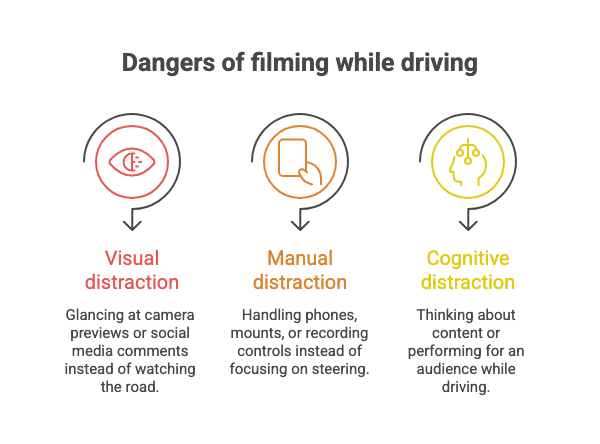
Filming while driving can combine several distractions at once. You may look at a screen, adjust a phone, and think about your audience instead of traffic.
The National Highway Traffic Safety Administration reports that 3,208 people died in crashes involving distracted drivers in 2024. That figure covers distracted driving generally. It does not identify how many deaths involved filming or social media.
Visual distraction: checking the screen instead of the road
A driver may glance at the camera preview to check lighting or facial expressions. Another may watch comments appear during a TikTok or Instagram livestream. Those glances compete with watching brake lights, lane markings, and people entering a crosswalk.
Looking back at the road does not recover the time already lost. Traffic may change before the driver recognizes a hazard.
Manual distraction: handling equipment instead of driving
Recording video while driving may involve holding a phone, adjusting a mount, or tapping recording controls. Reaching for dropped equipment adds another distraction. These actions can interfere with steering and other driving tasks.
A phone mount can reduce some handling. It does not prevent the driver from checking the screen or becoming distracted by the recording.
Cognitive distraction: performing for an audience
A driver can keep both hands on the wheel while thinking about a punchline or rehearsing an introduction. Planning what to say may compete with noticing a changing traffic situation.
The AAA Foundation’s research on cognitive distraction found impaired responses and reduced scanning even with eyes forward and hands on the wheel. Its conclusion is useful here: hands-free does not mean risk-free.
That research examines cognitive distraction. It does not establish a specific crash-risk multiplier for filming or livestreaming.
How far can you travel during one distracted glance?
At 60 mph, a vehicle travels 88 feet each second. A three-second glance covers 264 feet before accounting for any braking. This is a speed-and-time calculation, not a measured average filming distraction.
For another perspective, NHTSA’s texting example describes five seconds with eyes off the road at 55 mph. The agency compares that distance to the length of a football field.
Filming creates its own reasons to look away. Checking whether a clip is recording can still consume distance needed to notice and respond to a hazard.
Why livestreaming while driving adds distractions
An ordinary recording may tempt a driver to check the preview. A livestream also brings an audience into the vehicle. Comments, questions, and notifications create new reasons to look away or respond.
Consider a hypothetical example. A driver starts a livestream before leaving a parking lot. On the road, a viewer asks a question. The driver checks the comment and misses traffic slowing ahead.
The problem is not the platform’s name. It is the attention diverted from driving. Filming for TikTok, Instagram Reels, Snapchat, or YouTube can create similar competing tasks.
Do not read comments, manage a live broadcast, or perform for the camera while driving. End those tasks before the vehicle moves.
Is filming safe if your phone is mounted?
A mounted phone does not make content creation distraction-free. Checking your appearance, adjusting the angle, and addressing viewers can still divert your eyes or attention.
A passive dashcam is different from a driver-directed vlog. A dashcam configured before travel can record without requiring a performance or ongoing interaction. That distinction does not make every mounted setup safe or lawful.
Keep equipment from obstructing visibility or vehicle controls. More importantly, do not monitor footage or adjust equipment while moving. If a recording needs your attention, find a lawful place to park first.
Is filming while driving illegal in Ohio or Florida?
Ohio and Florida regulate device use differently. Neither state’s rules should be reduced to “every recording is illegal” or “mounted phones are always allowed.” The device, interaction, location, and circumstances matter.
Ohio: electronic-device restrictions extend beyond texting
Ohio Revised Code Section 4511.204 generally prohibits using, holding, or physically supporting an electronic wireless communications device while operating a vehicle. The rule applies on streets, highways, and property open to public vehicular traffic.
Holding a phone to film while driving can fall within that prohibition. However, the statute includes exceptions. These address emergency contacts, certain stationary situations, and specified navigation, single-touch, or hands-free functions, subject to conditions.
A mount does not resolve every legal question. The driver’s actual interaction and the exception’s conditions still matter.
A first violation carries a fine of up to $150. Repeat violations and specified construction-zone violations can carry higher penalties. These traffic consequences are separate from potential liability for causing a crash.
What about recording at a red light in Ohio?
The statute contains an exception for a stationary vehicle at a highway signal currently directing traffic to stop. It also identifies other stationary situations.
That exception is not a safety endorsement. A recording can continue distracting you after the signal changes. Park lawfully in a safe location before creating content. Certain younger drivers face separate Ohio device restrictions.
Florida: texting rules and handheld-use zones are different
Florida Statutes Section 316.305 prohibits specified manual typing and nonvoice communications while operating a vehicle. Sending or reading text-based communications can trigger the rule. Typing a message to livestream viewers can create that issue.
This provision is not a universal ban on every form of recording. A separate law, Section 316.306, restricts handheld device use in designated school crossings and school zones. Its work-zone restriction applies when construction personnel are present or operating equipment on or immediately beside the road.
Florida also requires careful and prudent driving under Section 316.1925. Dangerous filming can raise careless-driving concerns even when a particular texting prohibition does not apply.
The absence of a blanket filming ban does not remove the duty to drive safely.
What about a stationary vehicle in Florida?
Sections 316.305 and 316.306 exclude stationary vehicles from their respective operating prohibitions. These are statute-specific exclusions, not permission to obstruct traffic or create a hazard.
Choose a lawful parking space instead of relying on a brief traffic stop. Complete filming before reentering traffic.
How filming can affect a car accident injury claim
A video may show a driver looking away, handling a phone, or responding to viewers before impact. That footage can help explain what happened. It does not automatically prove fault or establish the value of an injury claim.
Connecting distraction to the collision
An injury claim generally requires showing that a driver failed to use reasonable care and caused compensable harm. The investigation must connect the distraction to the crash, not merely show that a phone was present.
For example, a clip might show a driver reading comments immediately before a rear-end collision. Investigators may compare that footage with witness accounts, vehicle damage, and other records.
A car accident lawyer serving Ohio and Florida can evaluate the evidence and identify what additional information may be needed.
Understanding possible compensation
Depending on the facts and applicable law, recoverable losses may include medical expenses, lost earnings, and other damages. Compensation is not guaranteed because a driver recorded a video.
Florida has additional rules affecting some vehicle-injury claims. Section 627.737 imposes injury thresholds for pain-and-suffering damages in covered cases. Medical findings and insurance circumstances therefore matter.
The firm’s personal injury practice provides information about seeking help after an injury.
What if the injured driver was also filming?
An injured person’s own distraction may affect recovery. Under Ohio’s comparative-fault statute, damages are reduced proportionately for the claimant’s fault. Recovery is barred when that fault exceeds the combined fault of others.
Under Florida’s comparative-fault statute, a party more than 50% responsible for their harm cannot recover in covered negligence actions. Lesser fault can reduce damages. Applicability and exceptions require case-specific review.
Do not assume you have no claim because you used a phone. Get an evaluation of the actual circumstances.
Preserving social media evidence after a crash
Public posts can disappear or change. Saving what you can lawfully access may help a later investigation. Preserve relevant material without altering it or accessing another person’s private account.
What information should you save?
If it is safe and lawful, preserve:
- The post’s exact URL and the account’s username.
- Screenshots showing the post, caption, and visible date.
- Any available original video files you already lawfully possess.
- The date and time when you found the material.
- Witness contact details and relevant messages.
Keep originals separate from working copies. Avoid cropping away useful context. A screenshot can help, but it may not capture the complete video or original file information.
Let your attorney handle further investigation
Do not guess passwords, impersonate someone, or pressure a driver to unlock a phone. Access to private material may require consent or legal procedures. An attorney can assess appropriate preservation requests and investigative steps.
If your own posts or recordings relate to the crash, preserve them too. Do not delete or edit relevant material without legal guidance. Discuss privacy and account-setting changes with your attorney rather than trying to manage evidence yourself.
What to do after a distracted-driving accident
Put safety and medical care before proving that the other driver was filming.
- Get to safety and call 911 when needed. Do not remain exposed to traffic to gather footage.
- Seek appropriate medical evaluation. Explain your symptoms and follow treatment instructions.
- Report the collision and exchange required information. Tell responding officers what you actually observed.
- Document the scene if safe. Photograph damage and road conditions, and collect witness details.
- Preserve relevant posts and records. Avoid accusations or arguments online.
- Speak with an attorney before signing a release. Understand how a settlement could affect your rights.
Florida PIP has a separate medical-treatment clock
Florida’s personal injury protection statute generally requires qualifying initial care within 14 days for covered PIP medical benefits. PIP means personal injury protection.
That requirement is separate from the deadline to file a lawsuit. Do not wait for an evidence investigation before seeking needed care.
Lawsuit deadlines also matter
Ohio Revised Code Section 2305.10 generally provides two years for bodily-injury actions after the claim accrues. Florida Statutes Section 95.11 generally provides two years for negligence actions under current law.
Older Florida claims, government defendants, and other circumstances may involve different rules. Do not calculate your deadline from a blog alone. Review the firm’s personal injury FAQs and seek advice promptly.
How to create social media content without driving distracted
You do not need to abandon content creation. Separate it from driving. Make the recording plan before departure and leave performance, editing, and audience interaction for a parked location.
Before driving, remove the temptation to interact
Set your route and audio before the vehicle moves. Silence nonessential notifications and place the phone where you will not reach for it. End active livestreams rather than assuming you can ignore viewers.
If a recording fails, let it fail. A missed clip is not a reason to adjust equipment while driving.
A parked-car filming check
Use a lawful parking space away from moving traffic. Secure the vehicle, check your surroundings, and finish the recording before driving again. Do not stop in a travel lane or use a highway shoulder merely to film.
If a passenger handles the camera
Passenger-operated recording can avoid the driver holding the phone. It still becomes distracting if the driver poses, turns toward the lens, or follows filming instructions.
Ask passengers not to involve you in the recording. Stop filming if it interferes with driving. For content requiring your participation, wait until the vehicle is safely parked.
How to choose a personal injury lawyer after a filming-related crash
Look for experience with accident investigations, disputed fault, and digital evidence. Ask who will handle the case and how the firm communicates. Relevant experience matters more than a promise of a particular result.
For commercial-vehicle collisions, the firm’s truck accident practice explains another area of representation. Whether an employer or other party shares responsibility requires investigation, not assumptions.
Best accident lawyer questions to ask at your consultation
Useful questions include:
- Have you handled cases involving phone use or video evidence?
- How would you preserve a post that might disappear?
- What evidence could connect filming to this collision?
- How might shared fault affect my case?
- Which insurance and filing deadlines apply?
- Who handles updates, and how often will we speak?
- How are attorney fees and case expenses handled?
Read the firm’s personal injury fees and legal resources before discussing the written agreement. Ask about expenses as well as attorney fees.
Learn about the attorney who may handle your case
Attorney biographies can help you evaluate relevant experience. Joseph A. Fraley’s biography describes his trial work and personal injury practice.
During your consultation, confirm which attorney would represent you. Ask how their experience relates to your crash and the evidence involved.
Frequently Asked Questions
Is filming yourself while driving distracted driving?
Yes, filming can be distracted driving when it diverts your eyes, hands, or attention from driving. A phone mount does not remove every distraction. Whether a specific action violates a traffic statute depends on the state and circumstances.
Is recording a TikTok while driving illegal in Ohio?
Ohio generally prohibits using, holding, or physically supporting an electronic wireless communications device while operating a vehicle. Holding a phone to record can fall within that rule. Statutory exceptions exist, so the exact conduct matters.
Does Florida ban every video recording while driving?
Florida’s texting statute is not a universal ban on every recording. Separate restrictions address handheld use in designated school and qualifying work zones. Careless-driving rules may also apply. The absence of a specific filming ban does not make distracted driving safe.
Can I film while stopped at a red light?
Ohio and Florida have stationary-use exceptions or exclusions in the statutes discussed above. Their scope differs, and other rules may apply. The safer choice is to park lawfully before filming and finish before returning to traffic.
Is livestreaming safe if I never touch my phone?
Not necessarily. Speaking to viewers, planning a performance, or reacting to comments can compete with attention to traffic. Hands-free operation does not eliminate cognitive distraction. Save interactive content creation for after you park safely.
Can a social media video help prove fault after a crash?
A video may help show distraction, timing, or events around a collision. It does not automatically establish fault. The footage should be preserved and assessed alongside other evidence, including witness accounts and crash records.
Should I delete a video that relates to my accident?
Do not delete or alter relevant recordings or posts without legal guidance. Preserve originals and discuss them with your attorney. Trying to remove unfavorable material can create additional evidence problems.
Can I seek compensation if I was also using my phone?
Possibly. Your own fault may reduce damages or bar recovery under applicable comparative-fault rules. Using a phone does not decide the entire case. The circumstances, connection to the crash, and applicable law must be evaluated.
Hurt by a driver filming behind the wheel? Contact Pencheff & Fraley
Filming, livestreaming, and checking comments can take attention away from the road. A mounted phone does not eliminate that risk. Ohio and Florida have different device-use rules, but every driver needs to focus on driving.
If you were injured, prioritize treatment and preserve relevant evidence. Pencheff & Fraley serves clients across Ohio and Florida, including Westerville, Mansfield, Jacksonville, Orlando, Kissimmee, Tampa, and Winter Haven.
Request a free, confidential consultation to discuss your circumstances. Call 866-753-0919 in Ohio or 904-562-1371 in Florida. The firm advertises no attorney fees unless it recovers compensation; ask about case expenses and the written agreement.
This article provides general information, not legal advice. Laws and deadlines depend on the facts and may change. Reading it or contacting the firm does not by itself create an attorney-client relationship.
References
These sources are also linked beside the relevant information above.
- NHTSA: Distracted Driving
- AAA Foundation: Measuring Cognitive Distraction in the Automobile
- Ohio Revised Code: Electronic-device use while driving
- Ohio Revised Code: Device use by younger drivers
- Ohio Revised Code: Comparative fault
- Ohio Revised Code: Bodily-injury limitations
- Florida Statutes: Texting while driving
- Florida Statutes: Handheld devices in school and work zones
- Florida Statutes: Careless driving
- Florida Statutes: Comparative fault
- Florida Statutes: Limitations periods
- Florida Statutes: Personal injury protection
- Florida Statutes: Vehicle-injury damages thresholds
